For partners and families
See the care your household has logged, including the pet, time, and caregiver. Check the shared timeline before taking over, and leave notes when a record needs context.
Shared care · iPhone + Android
John and Jamie are abroad in a different time zone. Fiona handles Buttons’ meals, medication, and litter-box care. They can wake up to her updates, without waiting for a check-in text.


Free: 2 pets · 2 members · 30-day activity history.
Premium: $5.99/month or $59.99/year (USD). Store price and terms apply.
Compare plans · See the sitter handoff ↓
John + Jamie · owners
Fiona · pet sitter
John + Jamie + Fiona · 3 members · Premium
A WEEKEND WITH BUTTONS
John and Jamie are out of the country, several time zones away. When they wake up wondering how Buttons did last night, Fiona’s updates are already in Kima.
Friday evening · At home
Fiona is looking after Buttons while John and Jamie are abroad. At 6:30 PM, Kima reminds her that Buttons’ medication is due.
Friday · 6:35 PM
Fiona gives Buttons her medication and completes the task. The shared timeline records her name and the time, alongside the meal and litter-box care she’s already logged.
While they’re away
John and Jamie get a notification when Fiona completes the medication task. She can get on with her evening, without sending a stream of updates to a group chat.
The next morning · Abroad
Over breakfast, they check last night’s care: dinner, medication, and a clean litter box. No waiting for Fiona to wake up. No scrolling through chat or asking, “Did Buttons get her medication?”
Three household members need Premium. See plans · Explore the timeline
Every pet has their own routine, from meals and medication to litter-box care. Kima lets you keep the context with the activity, so your partner or sitter can check the right record rather than reconstructing a conversation.
Inside Kima
Use pet, activity, or member filters to find the records you need. See who logged each update and when.
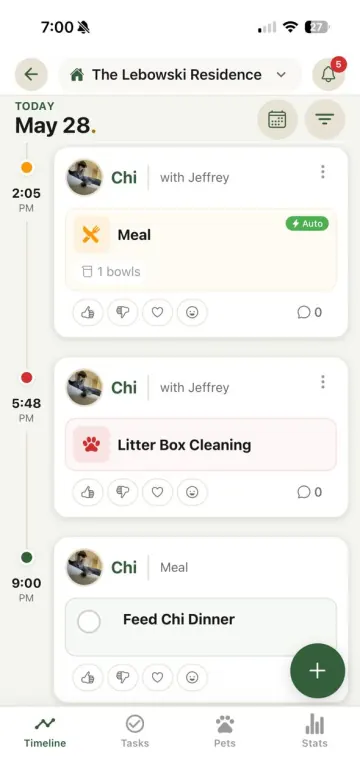
See the care your household has logged, including the pet, time, and caregiver. Check the shared timeline before taking over, and leave notes when a record needs context.
Give each pet its own profile. Keep their care activities and tasks together, then filter the timeline by pet or activity.
Invite a sitter into the household and set membership start and end dates. They can log care, complete tasks, and leave activity notes while their membership is active.
Keep medication logs and observations together, with dates, times, and notes. Bring a clearer history to vet visits, so you can explain what happened and how often without relying on memory.
A shared care log should help the next caregiver understand the record. Kima activities support amounts, units, food brands, ratings, and notes. The timeline can be filtered by pet, activity type, or household member.
Use your agreed care plan. Kima records care; it does not choose food, portions, or medication instructions. If an entry is unclear, contact the caregiver instead of treating a missing record as proof that a meal did not happen.
01 · Set up
Create the pet profiles, invite the people who care for them, and agree who handles each part of the routine. Share your agreed routine and care instructions.
02 · Plan
Assign recurring care, such as medication, to a household member. Reminders can bring up the task; completing it adds an activity to the timeline.
03 · Check and log
Completing a recurring task creates an activity. If you are not using a task, log the care activity. Avoid adding a second manual entry for the same completed task.
See meal logging in action →
Start with the activity logging guide and recurring task guide. For a worksheet you can share outside the app, use the dog feeding tracker guide.
Yes. Invite them to your Kima household so both of you can check the shared timeline and log care. Free includes 2 household members. Owner + partner + sitter is 3 members and requires Premium. See current pricing before inviting a third caregiver.
Kima supports multiple pet profiles, not just dogs. Free includes up to 2 pets; Premium supports unlimited pets. Each pet can keep its own activities and tasks. Check your plan before setting up a larger household.
Kima helps your household record and coordinate care. Use the plan agreed for your pet with your veterinarian and record what you did. A missing entry needs clarification, not a guess.
Planning a trip? Read the sitter handoff checklist. Coordinating a larger routine? Use the multi-pet schedule guide.